Mystery Bail Theater

Sometimes worth reading (Updated Mondays, Pre-written Articles)

September 3, 2008

Roll of Thunder, Hear me Trace

Filed under: General — dvander @ 3:56 am

Sorry about the lack of Monday updates. Work has been busy.

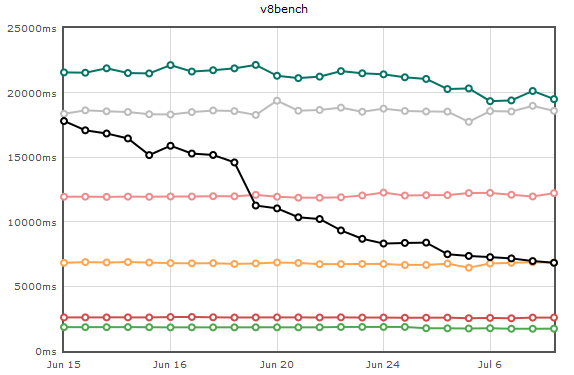
Things got interesting with Chrome’s new V8 JavaScript engine. Brendan Eich blogs about how it performs against TraceMonkey.

It’s getting very stable — the last week had some intense bug fixes, and Jesse Ruderman’s fuzzer has kept our debugging workload heavy.

The plan is to continue rolling out incremental improvements and news as TraceMonkey progresses. There’s lots of big performance wins on our :TODO: list.

August 22, 2008

SpiderMonkey + Tracing = TraceMonkey

Filed under: Articles, Coding, Mozilla — dvander @ 3:00 pm

Firefox has a JIT for JavaScript now. Whoa. Before I continue on, here are links to the blogs of other Mozilla people close to the TraceMonkey team:

So, I started at Mozilla by working on Tamarin-Tracing. Tracing is Andreas Gal’s fancy new idea for run-time guided JIT optimization, a powerful new concept that poses huge benefits over whole method compilation. I talked about this before, perhaps erroneously, but the concepts are there.

The old style of compilation is to perform static analysis on entire methods at a time, compiling them to assembly when necessary. Without running the program, you decide how to compile loops and nested loops efficiently, perhaps even trying to decide if they’re expensive or not. Methods may or may not be inlined, but they are still the fundamental building block of most compilers.

The concept of methods quickly disappears in a tracing compiler. Everything is inlined as the tracer only compiles exactly what low level operations it sees being performed (and any sort of control flow is essentially a no-op). A tracing JIT essentially turns an expensive loop into its own isolated method call, optimized for its run-time properties, regardless of where it is or what the loop has to call into.

Andreas’s original paper on tracing was targeted toward mobile performance, where whole-method compilation and static analysis are too expensive. For dynamic languages one instruction can have many decision paths at run-time. Whole method JITing is a real problem because the code required for each opcode becomes very large, and static analysis is either unfruitful (because of dynamic types) or just too expensive. This is especially problematic for JavaScript where browser performance is critical, and time spent analyzing code is time wasted.

Thus it’s no surprise that Adobe decided to try tracing in the next generation of their Tamarin project. Adobe’s approach to tracing ActionScript is to create very primitive building blocks and trace those at the lowest level. It does this by converting ActionScript bytecode to a Forth dialect, and tracing the primitive Forth operations.

Mozilla’s JavaScript engine (”SpiderMonkey”) is very different. It has a decade worth of optimization hacks and very “fat” opcodes (instructions that have a lot of internal decisions, rather than performing one single operation). Although there were originally plans for Mozilla to switch to Tamarin, throwing out SpiderMonkey had a lot of hurdles, and the TraceMonkey project was started instead.

Luckily Adobe had very nicely separated the tracing backend from their interpreter. Tamarin-Tracing has a “nanojit” component with a simple IR. Interpreters are responsible for emitting the IR, and nanojit can compile straight-line IR blocks into native code. It can also link compiled code fragments together for attaching branches and building trees of traces.

Using Adobe’s nanojit, Andreas decided to take a top-down approach to tracing SpiderMonkey. The edge of every loop is monitored. If a loop is executed enough times, the tracer is activated. Every opcode is hooked and critical decision points are emitted as nanojit IR where possible. When the control flow reaches the loop edge again, the IR is compiled and the loop will run as native code thereafter.

There are some fascinating aspects to Andreas’s work. Type speculation and specialization, the native stack versus the script stack, tree specialization, his handling of global variables — are all intricate and critical to the rapid progress and success he’s made on TraceMonkey. And he (and Mike Shaver and Brendan Eich) did it all in 60 days, which is amazing.

What’s my role in all this? My summer intern project was porting the code generator and tracer to AMD64, which has landed and seems to work in the shell. I’ve also been debugging anything that goes wrong on the 32-bit port. Working with nanojit was a lot of fun - Adobe did a great job making it usable by other projects, and it’s definitely something that could become a generic library for dynamic languages to use for tracing.

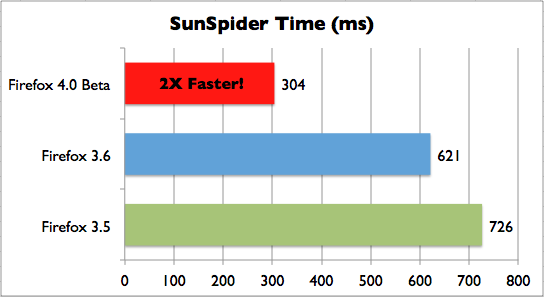
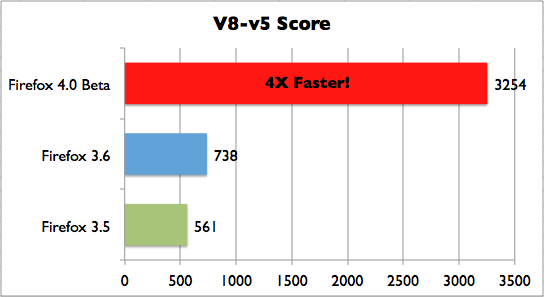
The big news today is that TraceMonkey has landed in mozilla-central and will probably be turned on by default for Firefox 3.1 beta 1. Although it was open source and downloadable during development, it is now being officially announced and publicized, and can be used in the official nightly builds. The speed difference is noticeable in sites doing intense JavaScript processing. And though the SunSpider benchmarks can be considered superficial, it’s great to see the improvements we’re getting on them versus the old SpiderMonkey.

This is just the beginning. A lot more is planned for TraceMonkey and for tracing in general. Code that used to be considered too crazy for JavaScript, like graphics and crypto loops, is becoming plausible. We’re already noticing smoother play quality in some 3D JavaScript games on the web (using Canvas) and in other heavy applications. In Mike Shaver’s words, this could change the way people use JavaScript.

In terms of portability, nanojit still needs a bit of work, but it’s been hammered into shape for AMD64 for the time being. It can use the extra eight registers available with REX prefixes, and it will perform 32-bit integer math versus 64-bit pointer math correctly (given using the correct LIR instructions for safety). I also took the liberty of prettying up the macros used for code generation. Some of the work remaining that I’d like to do in terms of the overall x32/x64 assembly process:

  • Taking more advantage of addressing modes — we can reduce register pressure by combining redundant store/load ALU operations.
  • Improving SSE2 logic which currently uses LAHF/PUSHF.
  • Improving calling conventions for SSE2 and reducing register spilling.
  • Inheriting type information from child instructions, to remove the need for separately typed IR instructions (i.e. no need for add versus fadd versus qadd).
  • Enabling 64-bit jitting in the browser (too unstable right now so it’s only on in the shell).

I should thank Edwin Smith at Adobe for putting up with my intense nanojit nagging; Mozilla for giving me the opportunity to work on this project as an intern; and Andreas Gal for coaching me through the tracing concepts every time I got them wrong.

For people who follow this blog from the SourceMod project, will SourcePawn get tracing? It’s something I’m experimenting with and will talk more about later. There are some hurdles to JITing Pawn in that very careful escape analysis is needed to make any of the nice optimizations.

August 4, 2008

Summit Thoughts

Filed under: Articles — dvander @ 12:21 pm

The Firefox 2008 Summit was — well — an adventure.

It was great being able to put a face to all of the names that pass by in Mozilla’s IRC. Andreas gave some great talks on trace compilation. John Lilly and Mitchell Baker gave some good speeches. There was a very interesting Q&A session where members of the community got to ask face to face questions with John, Mitchell, and Brendan Eich. It was a diverse and global group as many of Firefox’s localizers were there.

The views in Whistler are fantastic. We took a two hour bus ride from Vancouver to the Westin Resort Hotel. There were some complications though. It turns out that there’s really only one fast route between Vancouver (where the airport is), and Whistler. And that path was hit by a rockslide on the second day of the Summit.

Later in the week a laundry truck hit the hotel’s transformer and we lost power for the entire morning (which was problematic because sessions were conducted on electronic whiteboards). When it came time to leave, the rockslide still wasn’t cleared yet, so we all had to take buses along the next shortest route. Unfortunately, that route was eight hours, so the buses had to leave at 2AM and 3AM to make our flights.

But my flight wasn’t until 3PM, so I spent another five hours or so in the airport (six, counting that our flight was delayed because a mechanic had to fix a seat’s reclining feature). All in all, it was a 16-17 hour trip to get home, but the Summit was worth it. Other people had worse trips back so I won’t complain.

Short digression: Mike Schroepfer (attributed with building Mozilla’s engineering division) recently announced that he was leaving Mozilla for Facebook. He had said he was leaving “the only job he ever truly loved.” It’s sad to see him go — he’s extraordinarily talented and there’s no doubt he’ll be a great asset at whatever company he works at.

On the last day everyone took gondolas up a mountain to have a dinner/party at the top. Sometime during the event, everyone started chanting “Schrep! Schrep! Schrep!” to get him to say something at the podium. He gave a short but very emotional farewell which received a standing ovation.

Mitchell Baker had given a long speech earlier in the week comparing Mozilla to a tree, so when she took the podium at the party, we were joking that we’d hear more about trees. But instead she gave a new, shorter definition of the community. One that I really like:

“Mozilla is people — having fun — improving the Internet.”

July 28, 2008

Firefox Summit 2008

Filed under: Articles, Mozilla — dvander @ 11:22 am

No article this week, we’re invading Canada as part of the Firefox 2008 Summit.

Tomorrow the project I’m on (TraceMonkey) is doing a presentation on our technology. Hopefully we’ll be able to blog about this soon, it’s some exciting stuff.

My summer intern project is complete going into the summit, which is a nice feeling. And now that Adobe has an AMD64 JIT backend to Tamarin-Tracing, I hope Flash 11 has some impetus for 64-bit builds.

(TraceMonkey will definitely use it, though Firefox can’t ship 64-bit builds without 64-bit Flash.)

July 22, 2008

Can you do this to your VP?

Filed under: Articles, Mozilla, Slice of Life — dvander @ 12:07 pm

Last week, us Mozilla interns held our annual intern BBQ. I guess one of the traditions is to throw someone in the pool.

This year they chose Mike Schroepfer (also known as “Schrep”). Schrep is the VP of the Engineering, and about five seconds with him is enough to know he means business. He talks fast and asks deep technical questions about the projects he oversees. This is an interesting trait, as he’s both very bright on a technical level while also being a high-level manager.

So when five+ interns tried to gang up on Schrep (who, as always, was dressed as neat as a pin), people on the sidelines seemed a bit apprehensive about how that’d play out. Lo and behold, not well.

In the process of trying to grab him, they accidentally tore his shirt. Then as they got close to the pool, Asa Doltzer warned them that Schrep’s shoes were too nice to get wet, so the interns had to pull them off. After that they gave up and dropped him to the ground by the pool.

Schrep didn’t look terribly pleased but he took it all in stride, even making a joke about it at the all-hands company meeting on Monday: “For the record,” he said, “Despite it being five-on-one, you guys still couldn’t take me down!”

I have a feeling that if I end up at another company, throwing the VP into pools won’t be an employee perk. Though, the only people I have been known to throw into pools are my brothers (who, as a trait of being younger than I, eternally deserve it).

July 16, 2008

Valve’s Changes to the Iterative Model

Filed under: Mozilla, Software Disappointment, Things that Annoy Me — dvander @ 9:11 pm

Today Mike Beltzner (Firefox Director) gave a very interesting presentation on software development models and how they apply and evolve at Mozilla. When he put up a slide about the iterative model, it included a picture from Wikipedia that looked like:

“Plan -> Design -> Implement -> Deploy -> Test”

Instead of:

“Plan -> Design -> Implement -> Test -> Deploy”

This elicited a few chuckles, since obviously no one tests after deployment. I almost shouted out, “Well, Valve does that.”

But I didn’t, since that’d be just wrong. Valve doesn’t test at all.

No, I do not consider that comment flamebait. In the past few weeks patches have had to go out twice because of things like servers crashing on load or massive memory leaks.

July 14, 2008

SourcePawn Design Mistakes

Filed under: Articles — dvander @ 3:55 pm

When we started working on SourcePawn some two to three years ago, we intended to rewrite everything but the compiler. Our goal was to design a new, better virtual machine that threw out the design problems of Pawn’s “AMX” (Abstract Machine eXecutable).

There seems to be three fundamental building blocks to a language implementation: A runtime, or environment, that encapsulates the entire virtual machine. Next, a context, which represents the state and stack frame of a virtual machine’s execution state (usually this is analagous to a thread). Lastly, a function is a bytecode stream that, when given a context of execution, can be run.

The big problem in Pawn/AMX was that it wrapped up everything about a plugin into a single structure. Its system call table, global variables, stack, heap, bytecode, debug data, exports, stack/frame pointers, et cetera, were all wedged into a single struct. Since everything is crammed into one (mostly immutable) structure, it was difficult to imagine something as radical as one context for all plugins. Each plugin had its own stack/heap pointer, meaning that there was a 1:1 mapping between contexts and plugins. This mapping could never be 1:n or n:1.

We didn’t quite recognize the full scope of these problems though, and fell into the same mistakes with SourcePawn. We introduced four new data types, three of which are essentially the same:

  • IPluginContext - You’d think from its name, it would be a context. But it’s actually the same as it was in AMX Mod X, a giant structure that contains many things unrelated to the concept of a context. It exposed random things like, binding natives to the plugin and executing a code by its internal address. It also exposed pushing raw data to the internal stack.
  • sp_context_t - A C-struct that backed an IPluginContext (in fact, IPluginContext was just a C++ wrapper around the struct).
  • IPluginFunction - A class for pushing data onto the stack and then calling functions.
  • sp_plugin_t - A struct that backed some info from the binary file; info that was used to rebuild a context if necessary.

Well, that doesn’t sound like much of an improvement. Worse, my original goal was to separate the virtual machine and JIT — feeling that these two functions were inherently different. They very well may be, but in the design above, they have to be tightly integrated. So a great deal of the API went towards pointless (and cludgy) abstractions. The VM lived in SourceMod’s Core, and the JIT lived separately, implementing a confusingly named IVirtualMachine interface. This silly decision meant that other projects couldn’t use SourcePawn, and we couldn’t isolate the runtime environment to one testable executable (i.e. like a language shell).

So in my great effort to fix this a week ago, I made some drastic changes. I stripped almost everything out of IPluginContext and placed it in a new IPluginRuntime. I removed sp_context_t and sp_plugin_t (the JIT still uses them internally, but they’re not part of the API). IVirtualMachine went away entirely, and all of the VM structures went from Core and into the JIT. You can now build sourcepawn.jit.x86 and write a console shell/host application around it (not that I’d recommend that).

This is only a small step though. The bigger problem is that SourceMod and SourcePawn rely on the inane concept of a context being directly hooked up to a single plugin. For example, the GetMyHandle() native will look at the plugin owning the context and return its handle. A better idea would be to look at the context’s most recent invoker, and give the handle of that back. Then a context is entirely separate from the concept of a plugin (which is just a collection of data and functions), and all it needs is a stack. All plugins would get a single, common stack owned by a single, common context.

Unfortunately, that is also hard to do for other reasons. Pawn uses relative addresses instead of physical/absolute ones, something we can’t fix without a massive overhaul of the compiler. Our implementation of the VM (and I think the default one as well) assumes a contiguous memory layout, where relativity to a base pointer is easy. So we’d need to introduce new heuristics for decoding local addresses: “is this address in the stack range of the calling context? or is it in the range of the data section owned by the calling function’s script?”

Because of the Pawn compiler, we are bound to decisions of the past. A proper language should treat a context as a thread of execution, rather than something that collects a set of functions. Or in other terms, a context should be an actual context rather than a plugin, just like operating systems differentiate between a process and a thread.

Fixing these decision issues is a long road for us, but if the “Pawn” concept wants to compete against more modern languages, I think it is a necessary step.

July 8, 2008

Optimizing Pawn, Part 2

Filed under: Uncategorized — dvander @ 1:21 am

Oops! A few hours late. Well, it turns out “optimizing Pawn” hit a roadblock. A nasty one. Take the following code:

func()
{
   new c = 3
   decl b[2]
}

The actual functionality is pointless, the important thing is to observe that Pawn’s compiler emits code like this:

push.c 3
stack -8
;zero out the array
zero.pri
addr.alt -12
fill 8

In this example, there is an “implied” notion that 3 lives on the stack as its own variable, and that the two stack slots reserved by the next instruction are part of an array of size 2. However, this implication is not a proof. The compiler could theoretically emit:

stack -12
const.pri 3
stor.s.pri -4
;zero out the array
zero.pri
addr.alt -12
fill 8

It could even emit the more optimal:

push.3.c 3 0 0

The fact that the compiler does not emit code like this is not a good thing. Well, it’s good if you want to make assumptions. But it’s bad in that Pawn isn’t very good at optimizing its own code. Is making assumptions a good idea?

Pawn’s problem is that its bytecode is too close to machine code. It uses the stack for any sort of structure possible, and there is no way to correctly tell the difference between a local variable that can be optimized away and an array that can be optimized in a tight loop. You can guess based on the general type of code that the compiler produces, but it’s not a guarantee, and optimal compiler code would actually break the heuristics. This worries me.

There are sketchy issues, for example it looks impossible to know the side effects of any stores that use manually computed addresses (read: almost every store related to arrays, references, or global variables in pawn). In a normal language, that’s okay because in general such structures are encapsulated properly. But in Pawn, writing to any address that might be on the stack means throwing out optimizations for everything else above it on the stack. Sure, you could guess as to what the compiler is telling you to do, but guessing doesn’t seem good enough.

Where does this leave the JIT2 idea I’ve thrown back and forth in IRC? Well, I do not know. I think some ideas from it are still plausible (for example, the “natives as bytecode” idea) even in the context of the old JIT. Function-granular compilation and static analysis seem out of the question though, as it’s too frustrating to guarantee the compiler’s semantics while getting the optimizations we want.

I have started a new internal project to explore Pawn’s future, and if it gets anywhere I’ll announce it further into the summer.

In the interim, I have spent a good deal of time refactoring Pawn’s API (currently in a branch called “refac-jit” that should land in trunk soon). Next week I’ll talk more about how to not design a language by learning from SourcePawn’s mistakes.

June 30, 2008

Optimizing Pawn, Part 1

Filed under: Articles, Coding — dvander @ 10:00 am

A few weeks ago we opened sourced the SourceMod JIT, and I stated that it wasn’t worth optimizing Pawn further with standard compiler algorithms. This statement was very wrong.

Over the past few days I have been working on an experimental “JIT2,” a new optimizing, method-granular compiler for Pawn bytecode. It’s got a lot of work ahead, but the initial results are impressive enough to warrant further efforts.

The Pawn compiler (as I have opined in the past) is real heap of a mess. It’s poorly written, full of bugs, and designed such that optimizations are essentially impossible. It essentially emits assembly as it parses, meaning it does almost no static analysis on control or data flow in a way that could optimize the code. It has a peephole optimizer, but this mostly replaces small groups of opcodes with another small group of opcodes (irrelevant to an optimizing JIT, aside from being more work to handle).

For example, take this Pawn function:

f()
{
    new a
    a = 5
    return a
}

Keeping in mind that Pawn has two registers (PRI and ALT), this compiles to:

push.c 0        ;push 0 onto the stack
const.pri 5     ;set PRI = 5
stor.s.pri -4   ;store the value of PRI into the stack
load.s.pri -4   ;load the value back into PRI
stack 4         ;remove used stack space
retn            ;return the value in PRI

This code is very verbose - it does four stack operations just to return the number 5. I found we could heavily reduce this by having the JIT analyze and convert Pawn opcodes to an intermediate representation (IR) that is inherently in SSA form.

Say we have the following opcodes in our IR:

  • imm loads an immediate value
  • retn returns the value of a previously executed instruction

We can completely reduce stack operations by creating a mapping of stack locations to instructions. We can track data flow by remembering what gets assigned to PRI and ALT. For example, let’s run through the bytecode and perform the analysis:

  1. push.c 0 is a stack operation. Emit code: imm 0, and store the instruction number in STACK[-4].
  2. const.pri 5 sets pri to the number 5. Emit code: imm 5, and store the instruction number in PRI.
  3. stor.s.pri -4 sets stack location -4 to PRI. So we take the instruction number currently in PRI, and store it in STACK[-4] (so now, it points to the imm 5 from step 2).
  4. load.s.pri -4 sets PRI to the value at stack location -4. So now we do the reverse of step 3: PRI = STACK[-4] (PRI still points to the imm 5).
  5. stack 4 destroys position -4, so STACK[-4] = NULL.
  6. retn returns the value in PRI, so we emit: retn X where X is the instruction number in PRI (imm 5).

What do we get when we’re done?

1: imm 0
2: imm 5
3: retn *2

We’re down to three instructions and absolutely no stack usage! How did this happen? We used copy propagation. By tracking the flow of data from the stack to Pawn’s registers, we were able to eliminate all of the unnecessary loads and stores. But we can do even better with dead code elimination.

For this phase, we mark every instruction with a “not used” flag. We then place “important” instructions into a work queue. The most important instruction is “retn” because it determines the output value. In this code, there is only one such important instruction (#3). For as long as the work queue has items, we remove the top item. We remove the “not used” flag, then add all child functions onto the queue as well. That means “retn” will be removed from the queue, and “imm 5″ will be added. When “imm 5″ gets processed next, it has no children.

Once the work queue is complete, any instructions marked as “not used” are removed. So now we’re down to two instructions:

1: imm 5
2: retn *1

One last simple optimization is constant folding. For example, the Pawn opcode ADD adds PRI and ALT together. If PRI and ALT are both imm instructions, we can simply compute the add ahead of time and emit and a new imm instruction.

Take the following snippet of Pawn code:

	new a, b, c, d
 
	a = 1
	b = 2
	c = 3
	d = 4
 
	a = a + b
	c = b + d
 
	return a + c;

This compiles to:

	proc	; main
	push.c 0
	push.c 0
	push.c 0
	push.c 0
	const.s fffffffc 1
	const.s fffffff8 2
	const.s fffffff4 3
	const.s fffffff0 4
	load.s.both fffffff8 fffffffc
	add
	stor.s.pri fffffffc
	load.s.both fffffff0 fffffff8
	add
	stor.s.pri fffffff4
	load.s.both fffffff4 fffffffc
	add
	stack 10
	retn

Yuck! What does SSA, copy propagation, constant folding, and DCE convert this to?

1: imm 9
2: return *1

It’s a long road ahead and so far only a few of the opcodes are ported to the IR. It is clear, however, that our already fast JIT can be made much faster.

June 23, 2008

Recent Replacements

Filed under: Uncategorized — dvander @ 12:00 pm

At AlliedModders we’ve been working on slowly replacing our aging “infrastructure” (big word for our little operation). In mid-2006 we got a Pentium 4 Xeon box at ThePlanet and the only operating system available was RHEL3.

Anyone who knows me knows I despise RHEL; yum is a huge pain. It doesn’t handle dependencies or core package upgrades well. It’s slow and its search is cumbersome. In order to not risk breaking the system we built everything from source and tried to completely avoid RPM packages. This meant a lot of cruft built up.

ThePlanet used to be good, but it seems their support quality has waned as of late (probably the result of the EV1 takeover). On two occasions our server simply rebooted with no explanation. They couldn’t provide answers as to why. In one of those cases, they simply closed the ticket saying “If you want to know, file another ticket.” Well, obviously, I wanted to know in the ticket already created for the incident.

Their control panel was decent but some information was just left blank — like serial access, which other big companies (like 1and1) provide. There was an incident where after 430 days of uptime, I got a call at midnight from CST from what sounded like a not-all-there ThePlanet technician. The conversation went like this:

TP: “I just got a ping notice that your server is down.”
Me: “Uh, well that’s strange. I didn’t turn it off. Why is it down?”
TP: “I dunno.”
(The delivery of this stupid statement dumbfounded me, so it took me a few seconds to recover.)
Me: “Well… can you find out?”
TP: “I guess… I can reboot it.”
Me: “That would be nice.”

After fifteen minutes it was still down, so I called the number they had called me from. This time they refused to talk to me since I couldn’t authorize myself (my customer information was on the server itself, a stupid mistake I won’t make again). I found this odd because they had called me fifteen minutes ago and taken a reboot order without even verifying my identity.

Eventually it got rebooted, but a few weeks later there was an explosion at their datacenter which took 9,000 servers offline (google “theplanet explosion” for coverage of the incident). We weren’t affected but it was the nail in the coffin - a few weeks later we completely moved to SoftLayer. I’d heard good recommendations of them in IRC, and they seem to be comprised of a few ThePlanet employees from times past.

(As an aside - I’m not the only one complaining about ThePlanet. My former employer had/has a large number of machines hosted at ThePlanet and frequently complained about support difficulties.)

Alongside that, we made a few big immediate changes. The first was ditching RedHat for Debian (my favorite distro because of its stability commitment, and the general convenience of aptitude). We also migrated to 64-bit. The next was ditching the “Cyrus” IMAP server. It seems no one can write an e-mail server that takes less than two days of work to configure properly. Cyrus was belligerent in refusing to consistently accept authentication methods and having archaic tools with poor documentation. Its configuration files were confusing and using its Sieve implementation required a weird FTP-like client. I’m sure that’s nice for a big setup but for <10 accounts it’s a huge pain.

So, Cyrus got dumped for Dovecot. So far I have plenty of praise for Dovecot. The documentation was pretty well written and had extensive use-cases with working examples. The authentication was easy to set up and its Sieve usage was trivial to get working. It even had an example of working with my favorite MTA, Postfix. I was able to convert over my 1.5GB maildir with only one annoyance (it didn’t maintain whether I had read a message or not).

The next big steps are moving to Mercurial over Subversion, and perhaps switching to Bugzilla over flyspray. Someday.

Older Posts »

Powered by WordPress